 WBWriter
Write it live.
Put it on the wall.
Free & open source · MIT
A stage whiteboard for macOS. Performers write on a touchscreen, and the audience sees it on the LED wall over NDI® or HDMI, with no toolbar on stage.
● NDI OK · STAGE-MAC (WBWriter) · 1920×1080 @ 50.00 fps · 2 rx · TX 36.2 Mb/s
Try it: draw on the board, then tap the eraser.
Built for the show
One pen. One button. Nothing else on stage.
Everything is set before the show. In live mode the performer gets a board and an eraser, and the video desk gets a clean signal.
- Clean NDI® feed
- Only the inside of the board is sent, with no UI and no border. Name the source yourself and pick a frame rate.
NDI 6.3 · 23.976–60 fps - Black or transparent
- Send a black background, or alpha for keying the writing over graphics.
BGRX · BGRA straight alpha - Your LED wall's resolution
- Enter the wall's exact pixels. The board is scaled to fit the touchscreen with the aspect ratio locked, so what the performer sees is what goes out.
1920×1080 · 3840×2160 · custom - HDMI program out
- Run a full-screen clean feed on any external display, alongside NDI or instead of it.
- Hatched no-draw zone
- The area around the board is hatched, so nobody writes where the camera can't see. The board also stays clear of the MacBook notch.
- Clear button you choose
- A large eraser in the corner you pick. Single tap, double tap for safety, or no button at all.
- Status line for the operator
- A small readout beside the board shows whether NDI is healthy, the measured fps, receivers, network load and battery. It never reaches the output.
- Show-safe
- Dock and menu bar are hidden, sleep is off, and the setup stays locked while live. Esc goes back to setup.
Signal chain
From a finger on glass to the back row.
- TouchscreenMacBook with a touch display on stage
- WBWriterRenders at the wall's resolution
- NDI® or HDMIClean feed over the network or cable
- Video deskvMix, OBS, Resolume, TriCaster…
- LED wallPixel for pixel, aspect intact
How it works
Set it up once, then just write.
Set up before the show
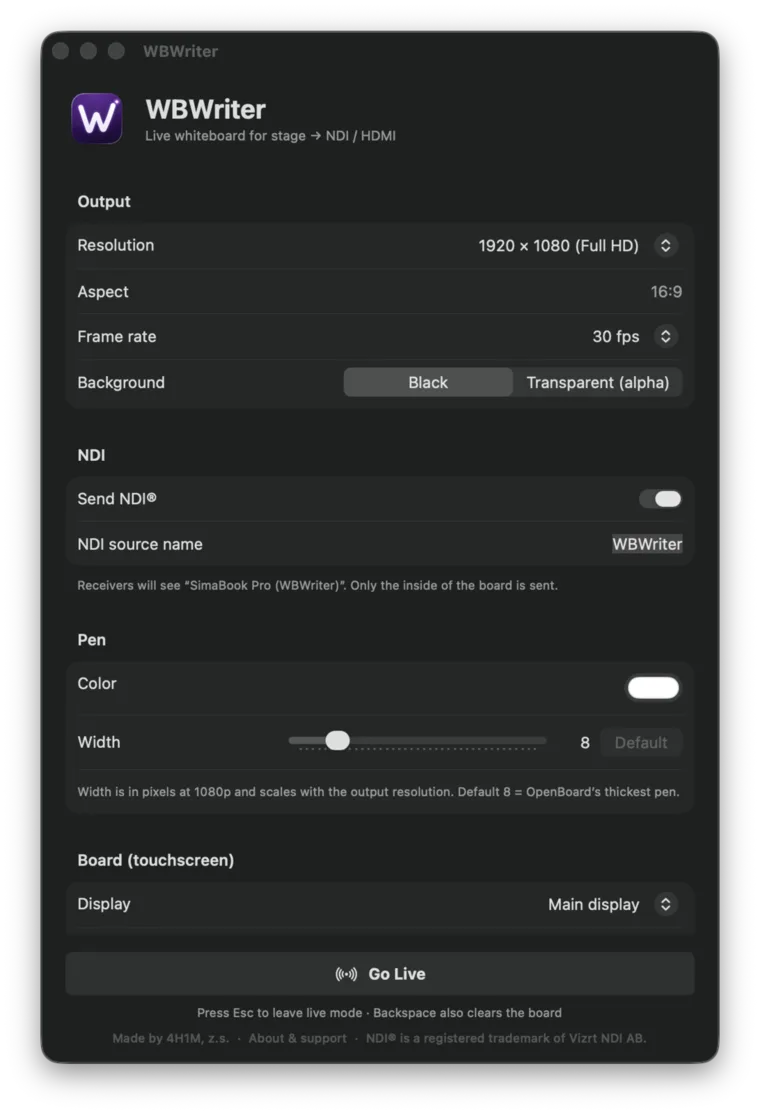
Resolution, frame rate, NDI name, background, pen color and width, where the clear button sits, and which screen is the touchscreen.
Go live
The board takes over the touchscreen. Receivers see the source as
MACHINE (WBWriter).Write
White marker on black by default, the same thickness as OpenBoard's strongest pen. Smooth, round strokes at full output resolution.
Clear and repeat
Tap the eraser between messages. Press Esc when the show is over.
Download
Free. Open source. Ready for tonight.
Download the signed app, or build it yourself from the source.
macOS
macOS 13 or later. Apple Silicon and Intel. Signed and notarized by Apple.
Download .dmgWindows
A native Windows build with the same board and NDI output is on the way.
Linux
Planned after Windows, for touch kiosks and media servers.
Open source
Every line is on GitHub.
WBWriter is open source under the MIT License. Read the code, check how the NDI output works, build your own copy, or change it for your show. Bug reports, ideas and pull requests are welcome.
- MIT licensed. Use it, change it and share it, in any production, commercial or not.
- Native and small. Swift and AppKit, with no web runtime inside.
- Built in the open. Issues, roadmap and releases are public.
- Signed releases from CI. Every tagged version is built, signed and notarized automatically.
# build WBWriter from source
$ git clone https://github.com/4H1Mzs/wbwriter
$ cd wbwriter
$ swift run
Building for debugging...
Build complete!
● WBWriter is ready to go live

Made by 4H1M, z.s.
Free tools from a nonprofit production crew.
4H1M is a Czech nonprofit audiovisual production serving churches and Christian events through sound, lighting, visuals, livestreaming and video. We build tools like WBWriter for our own shows and share them as free, open-source software. If it helps yours, you can support our work.
Questions, support or a show you'd like to tell us about: simon@4h1m.com